Load Balancer
A nice introduction to load balancing.
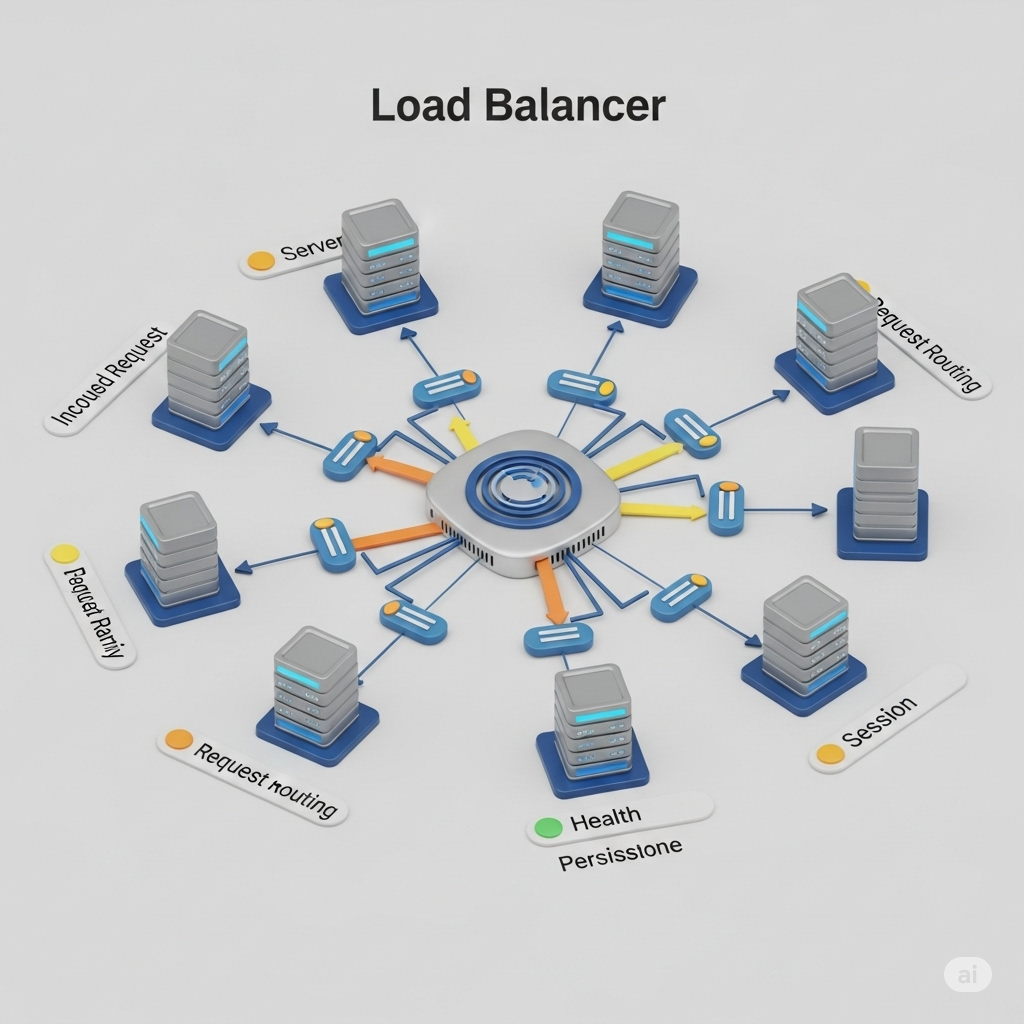
A load balancer is a device or software that distributes network traffic across servers in order to prevent overload.
General Concept
Think of a restaurant manager — what do they actually do? If you pay attention, they don't serve the customers themselves; they manage the workload according to the available waiters.
When customers arrive (requests), the manager doesn't attend the tables — they look across the floor, see which waiters (servers) are most available, and direct customers to them. If a waiter, for example, gets sick and leaves the floor (server failure), the manager stops sending customers to them and distributes among those who remain.
Pulling this to a slightly more technical angle, the LB acts as a Reverse Proxy. It sits between the clients (internet) and the back-end servers. Its main function isn't just to avoid overload, but also to enable High Availability (HA) and the famous Horizontal Scaling — adding more machines side by side, instead of buying a more powerful machine.
How it acts
It will act as the single initial point for clients to communicate with the servers. So it's the one that determines where the client's request should be directed.
| without load balancer | with load balancer |
|---|---|
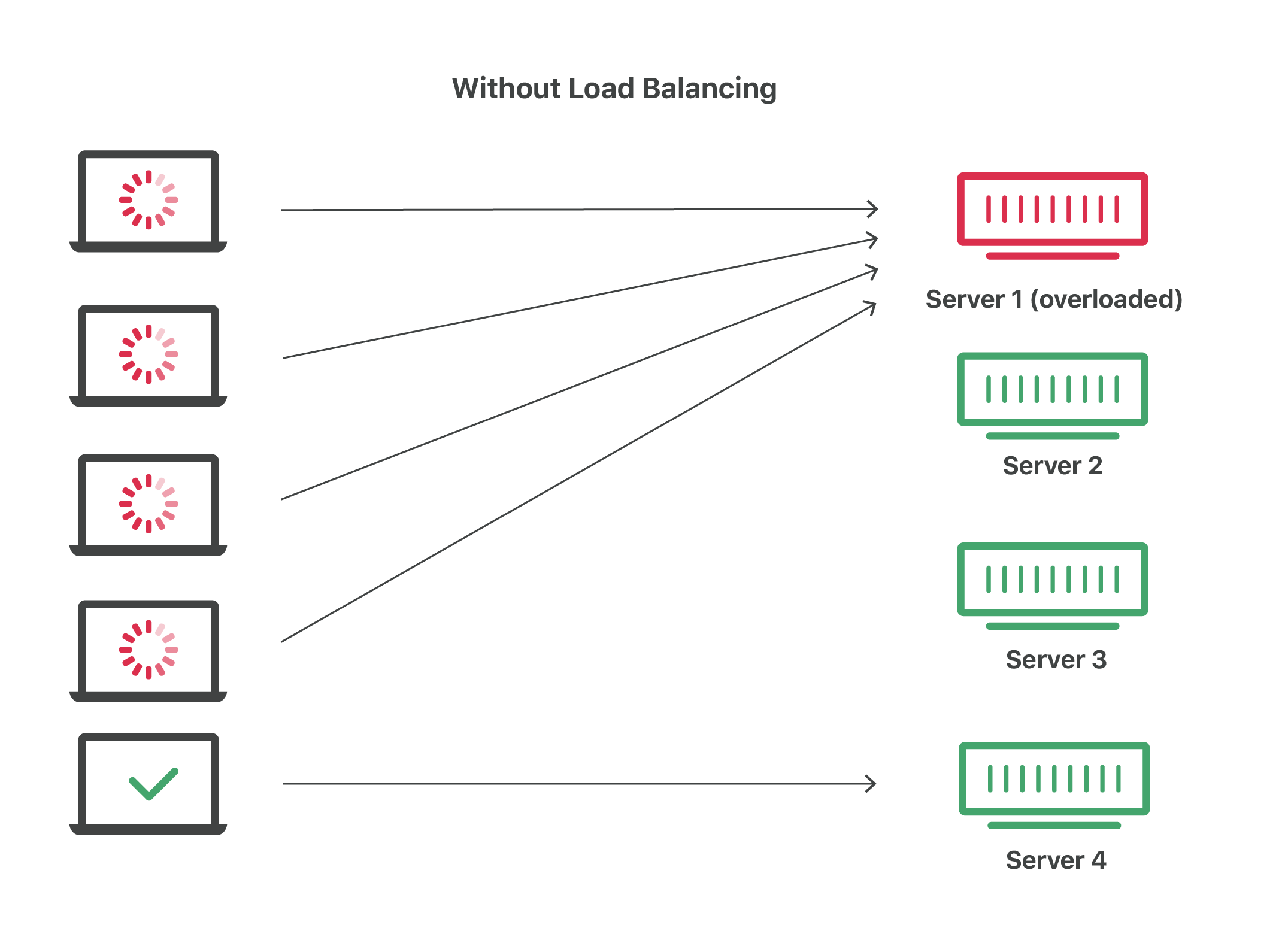 | 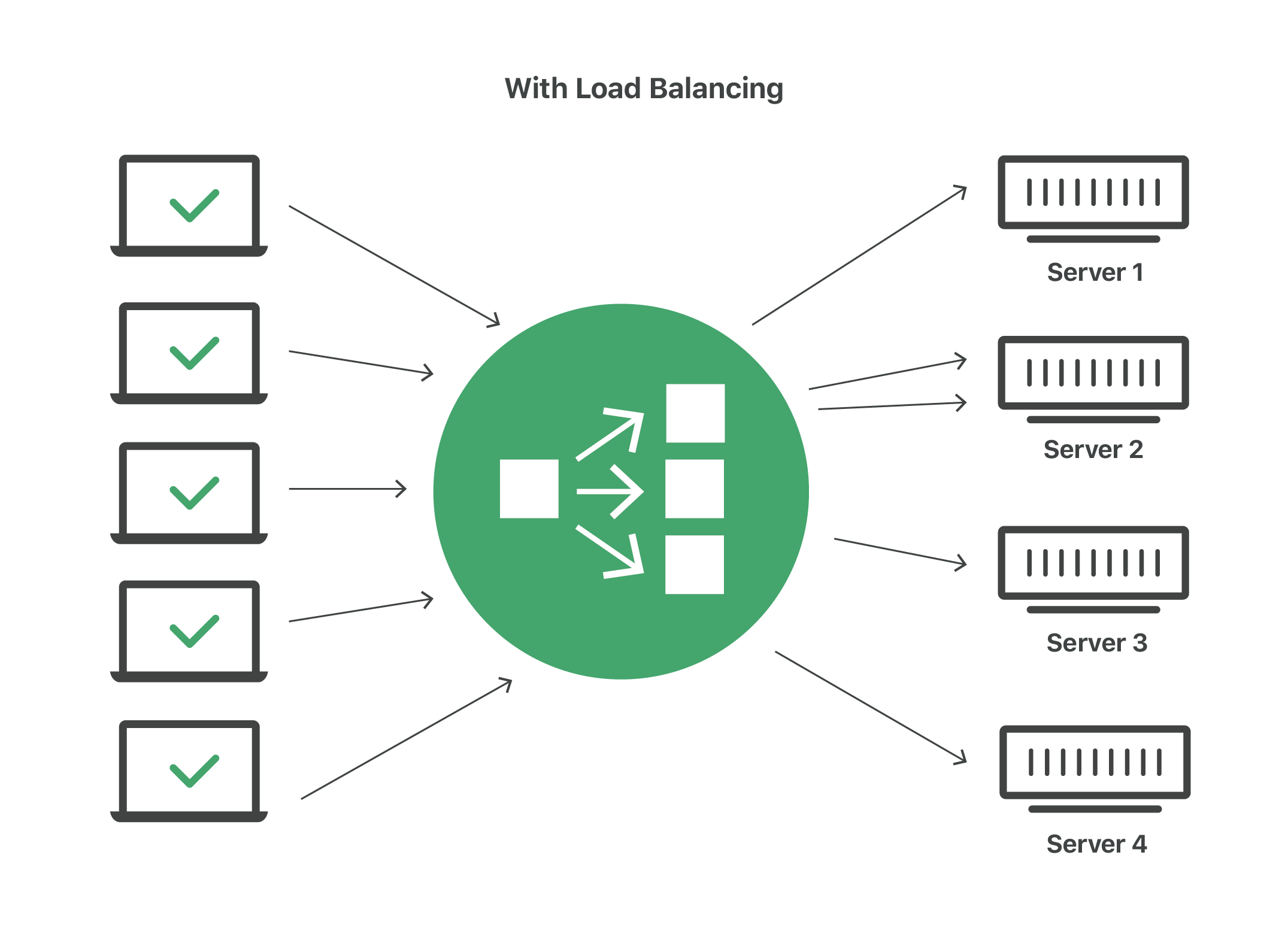 |
You might wonder: since it's the single point, if it goes down does the application break? Let's look at that below:
Obviously, as with many other things in real life, there's always a possible solution. This case is no different: Load Balancers never work alone. They operate in pairs (Active-Passive or Active-Active mode) so that if the primary LB fails, the secondary takes over.
Types of load balancers
Balancers can be classified depending on what kind of load they check. In the industry, when we talk about types of load balancers, we're basically talking about the OSI Model layer they operate on.
If you want to learn a bit more about the OSI Model, I left some great links in the references section.
Application Load Balancing
Many large and modern applications today have server farms with multiple servers dedicated to specific functions of the application. So the load balancer examines the content of the request (like HTTP headers or SSL session IDs) to redirect traffic.
- Example:
an e-commerce application has product, cart, and checkout services. The load balancer will send product requests to servers that contain images and videos, but don't need to maintain the connection.
On the flip side, it sends cart requests to servers that can maintain multiple connections at once and store cart data for a long time.
This operates at Layer 7 — since it understands HTTP/HTTPS, it can read the entire request (headers, cookies, URL routes). That's why it can send the /cart request to server A and /products to server B.
Network Load Balancing (NLB)
Examines IP addresses and some other network information to direct traffic.
They track the application's origin and can assign a static IP to multiple servers.
This one is different — as you might imagine, it operates at the Transport layer (TCP/UDP). It doesn't know what's inside the request (whether it's a photo, text, or video). It only looks at source IP, destination IP, and port.
Because it's more "blind," it's extremely fast and handles absurd volumes of traffic.
Global Server Load Balancing
Load balancers will balance requests according to available data centers or servers in the region. Meaning that companies can have data centers deployed geographically around the world, or use cloud providers.
DNS Load Balancing
You configure a domain for a group of resources, then when a request is made to it, the load balancer distributes it to which resource will receive it.
Types of Load Balancer technology
-
Hardware Load Balancer: physical devices that are installed and maintained locally.
-
Software Load Balancer: software that is installed on private servers or virtual machines, or delivered as a cloud service.
The difference between the two is that hardware requires an upfront investment, configuration, and ongoing maintenance. It's good for use cases with traffic spikes, like an escape valve.
Software-based ones are more flexible. They cost less and can also scale very easily given the advancement of cloud computing.
How it works
To prevent a server from being overloaded when clients send requests, the load balancer forwards the requests to multiple available servers hosted on server farms or data centers.
When the chosen server receives the request, it responds to the client through the load balancer. After doing so, the load balancer typically ends the client's connection to itself and opens a new connection with the server. So the server knows who the original client is, the Layer 7 Load Balancer usually adds a header called X-Forwarded-For with the client's real IP.
The server and client will be able to communicate and process actions until the session is closed.
Summarizing the basic flow:
- => Client sends the request to the load balancer;
- => It analyzes the request and forwards it to an available server (using a predefined algorithm)
- => The server processes the request and sends the response to the client.
Load Balancing Components
For the situation above to run properly, there are important concepts and components to keep in mind.
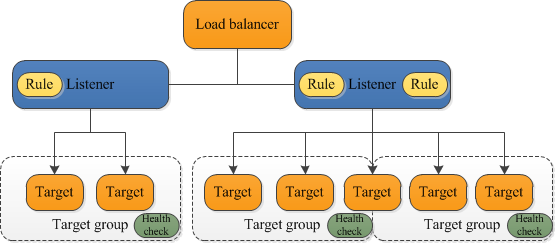
The listener, for example, is the one that monitors requests on a specific port and protocol, and then forwards them to a target group.
That target group is the set of servers where traffic is distributed.
Finally, we have the health check, which is the mechanism that analyzes whether a server is available to receive traffic by making continuous calls (pings or HTTP requests to a route like /health) every X seconds. If the server doesn't respond with a "200 OK" status after a few attempts, the LB marks it as "Unhealthy" and stops sending traffic to it.
NOTE
The terms Listener, Target Group, and Health Check are the names used in the context of AWS (Amazon Web Services) and some other cloud providers, but in other tools (like NGINX or HAProxy) Target Groups may be called Upstream or Backend Pools, for example. In other words, the naming conventions may end up being different depending on the tool.
Advantages of using a load balancer
-
Availability: If a server experiences some kind of problem and fails, the load balancer will redirect the request to another server that is operating normally.
-
Performance: Since it distributes loads across multiple servers, it can avoid bottlenecks and ensure requested responses are returned as fast as possible.
-
Scalability: With it available to redirect traffic, we can add as many servers as we want without having to interrupt the service in any way.
-
Easy maintenance: Just as mentioned in the previous point, it redirects — which also means we can perform maintenance on any server without impacting the service.
-
Security: they can include SSL encryption, web application firewalls (WAF), and multi-factor authentication (MFA). Another very interesting thing is that by using a load balancer and having it distribute the load, DDoS attacks are also mitigated.
Load Balancing Algorithms
When I mentioned the basic flow earlier, I brought up an "algorithm" that would be responsible for checking which server is available to receive a request. Well, that's exactly what we're talking about here. These have specific characteristics for each use case and request requirement.
Static Load Balancing
Static load balancing algorithms follow fixed patterns and rules, independent of the server's current state.
Round-robin
This algorithm uses DNS (name <=> IP mapping) to assign requests to each server. It's the most basic because it only uses the server names to determine which one will receive the request.
Weighted round-robin
In this case, in addition to the name, servers also receive a "weight." That weight determines which servers should have priority over others.
In this case, an administrator is needed to set which server has priority based on its capacity.
IP Hash
The load balancer performs a calculation called a hash that simplifies the client's IP address by converting it into a number. That number is then mapped and allocated to the servers.
You'll often see this in e-commerce, like the example I mentioned earlier. There's something called Sticky Session (or Session Affinity). Sometimes the client needs to always land on the same server throughout their entire session (for example, because the server saved the cart state in local memory). The Load Balancer uses cookies or IP Hash to "stick" that user to that specific server.
Dynamic load balancing
In this case, the algorithms observe the server's current state to execute and perform balancing.
Least connection
The name is intuitive — it gives priority to servers with the fewest active connections.
Weighted least connection
The algorithm assumes that servers can handle more or fewer connections according to predefined weights.
Least response time
It combines the lowest connection time with the lowest average server response time. The server with the fewest active connections and fastest response will receive the request.
Resource-based
The server will be allocated based on available resources (computing capacity and memory).
A software called an agent runs on each server to calculate the server's resources.
Conclusion
From everything we've been through, we can conclude that load balancing is fundamental for large applications or systems that process a lot of data and need to deliver it without any loss or overload — like an e-commerce system, for example.
References
About LB in general:
- https://www.f5.com/glossary/load-balancer
- https://www.cloudflare.com/learning/performance/what-is-load-balancing/
- https://www.ibm.com/think/topics/load-balancing
About the OSI Model: